Voxel Shop beta is live. Expect occasional bugs. Learn more
CustomScreenMenu 1.4.9
An amazing plugin that lets you fully customize the player's screen options menu
Page 1 2
1.4.9
Aug 23, 2026
Changelog
Added interactive menu text features: hover text and cursor styles, animated click icons, MiniMessage chat actions, and permission-based text. Added a built-in CMP tutorial with Chinese, English, and Russian language switching. OP players can use /cmenu tutorial to receive the tutorial link. If unavailable, configure the URL (for example, http://127.0.0.1:8169/) or open CMP.html from the plugin folder. Added configurable HTTP server port, bind address, and public URL. Settings and the service can be reloaded. Fixed Maven resource filtering corrupting tutorial JavaScript. Replaced unsupported clickable file: links on Paper 26.1 with the built-in HTTP service.
Fixed hover, click, and cursor movement sometimes stopping after next-menu. Fixed delayed cleanup from an old menu removing the newly opened menu’s state. Added menu-key and session validation to delayed creation and cleanup tasks. Cursor updates now use the active menu in currentPlayerMenus instead of scanning the camera world. Cursor movement is calculated relative to the menu camera’s yaw and pitch rather than the player’s absolute rotation. Added a PlayerMoveEvent fallback for rotation updates missed by Paper 26.1.2. Enabled same-camera refresh when menus share a camera position. Before refreshing, CMP verifies that the camera exists, remains valid, and still carries the player. Fixed black screens and flickering when next-menu and stop-menu.enabled are both enabled. Same-camera transitions now preserve the camera and replace only menu text, items, and interactions for a seamless result.
PS:Special thanks to user Orven for their help, suggestions, bug fixes, and feature recommendations.
1.4.8
Jul 28, 2026
Update fixes
UI & Interaction: Typewriter effect for buttons now properly activates on first menu open Cursor smoothing and tri-axis size configuration now fully effective Auto-rotation and menu mode now active Event Listeners: Removed duplicate MenuListener registrations Eliminated duplicate join-run executions Registered and fixed WorldChangeListener Player & Location: NPC world disable, equipment/skin sync now active use-player-location changed to per-player independent Section, no longer overwriting each other IP & Network: IP lock count, lock duration, and same-IP login configuration now effective CIDR now supports IPv4, IPv6, and non-whole-byte masks Fixed IP warning language key path
1.4.7
Jul 23, 2026
Update fixes
Bug Fixes:
Fixed PAPI variables outputting values even when player is not in menu mode
New Features:
Added hover interaction commands for menu buttons
hover-enter-command – Executes when cursor hovers over button
hover-leave-command – Executes when cursor leaves button Added compatibility with CraftEngine plugin images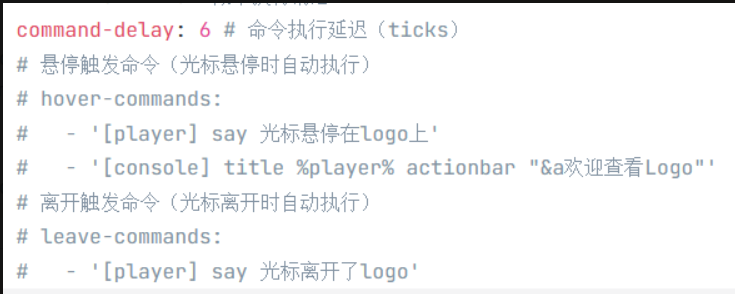
1.4.6
Jul 18, 2026
Update fixes
Menu Animation Effects – Add dynamic visual effects to buttons
Three animation types supported:
- up-down – Vertical floating
- left-right – Horizontal floating
- rotate – Rotation
- Adjustable animation speed and amplitude
name: "Your Button Text"
x: 0
y: 0
z: 3
# ⬇ Floating animation config
floating-animation:
enabled: true # Enable animation (required)
type: "up-down" # Animation type (required)
speed: 1.5 # Animation speed, higher = faster (optional, default 1.0)
amplitude: 0.3 # Animation amplitude, higher = more noticeable (optional, default 0.25)
1.4.5
Jul 11, 2026
Update fixes
🔧 Bug Fixes
Paper 26.1 Compatibility
Left-click: Fixed the issue where left-clicking menu text did not execute commands in version 26.1. Left-click swing events now trigger properly.
⚡ Optimizations
Built-in SQLite Driver: Bundled sqlite-jdbc directly into the plugin to prevent load failures caused by server environment download issues.
Language File Caching: getLangMessage now uses cached reads, reducing performance overhead from frequent IO operations.
Database Thread Safety: Added synchronization control to key DatabaseManager methods to lower SQLite concurrency access risks.
Improved State Cleanup: Strengthened menu state cleanup for player quit, kick, reload, and abnormal scenarios to reduce memory leak risks.“
1.4.4
Jun 16, 2026
Update fixes
Bug Fixes:
- Fixed inconsistent hover/click detection range between menu text and cursor when adjusting text-size and cursor scale
- Added cursor movement sensitivity config sensitivity (1.0 = default, lower values = slower movement)
- Added cursor smoothing factor config smoothing (0.05-1.0, 1.0 = no filter zero delay, lower = smoother but more drag)
- Text size now supports unlimited scaling up or down
- Fixed several known performance-related errors
version: "1.4.4" # 不要修改Debug: false
# 是否开启南瓜头
use-pumpkin-overlay: false
# 是否以玩家当前所在位置/朝向作为菜单相机坐标
# true -> 忽略菜单 yml 里的 camera-position,用玩家当前脚下
# false -> 使用菜单 yml 里写死的坐标(原有逻辑)
use-player-location: false
# 是否设置自定义的玩家结束菜单的朝向
exit-camera:
yaw: 0.0
pitch: 0.0
# 生物生成限制配置
creature-spawn-limits:
enabled: false # 是否启用生物生成限制
radius: 10 # 以菜单为中心的禁止生物生成的半径(方块)
# 摄像机视角方块检测配置
camera-block-check:
enabled: true
radius: 1 # 以玩家为中心的检测半径(方块)
# 按钮访问控制配置
button-access-control:
# 需要登录才能点击的按钮标识配置
login-required:
# 在按钮名称中包含的标识文本
name-tags:
- "[需要登录]"
- "%img_logo%"
# 在按钮键名中包含的标识文本
key-tags:
- "login_required"
- "%img_logo%"
# 防止重复注册的按钮标识配置
no-duplicate-registration:
# 在按钮名称中包含的标识文本
name-tags:
- "%img_logo%"
- "[NO_DUPLICATE_REG]"
# 在按钮键名中包含的标识文本
key-tags:
- "no_duplicate_reg"
- "防止重复注册"
# IP绑定安全配置
ip-binding:
# 是否启用IP绑定(同一IP只能注册一个账号)
enabled: true
# 是否严格模式:IP不匹配时直接拒绝登录
# false -> IP不匹配时发出警告但仍允许登录
# true -> IP不匹配时直接拒绝登录
strict: false
# 是否允许同一IP的用户登录已注册的账号
allow-same-ip-login: true
# 锁定时间(分钟):密码错误多次后锁定
lockout-duration: 5
# 最大登录尝试次数
max-login-attempts: 5
# IP白名单配置
whitelist:
# 是否启用IP白名单
enabled: false
# 白名单IP列表(支持CIDR格式,如 192.168.1.0/24)
ips: []
# - "192.168.1.1"
# - "10.0.0.0/8"
# IP黑名单配置
blacklist:
# 是否启用IP黑名单
enabled: false
# 黑名单IP列表(支持CIDR格式,如 192.168.1.0/24)
ips: []
# - "192.168.1.100"
# - "10.0.0.50"
# 管理员IP白名单配置(仅对OP玩家生效)
admin-ip-whitelist:
# 是否启用管理员IP白名单
enabled: false
# 允许登录的IP列表(支持CIDR格式,如 192.168.1.0/24)
ips: []
# - "192.168.1.1"
# - "10.0.0.0/8"
messages:
prefix: '&f[&eCustomScreenMenu&f] '
command_blocked: '&c固定视角下无法使用命令!'
sound:
name: 'music.menu'
volume: 1
pitch: 1
# 循环音效
loop:
# 是否开启
enabled: true
# 每隔多少秒播放一次
duration: 30
# 加入游戏就执行菜单
join-run:
enabled: false
# 延迟多少秒执行
delay: 3
# 执行的菜单
menu: 'test'
commands:
- "[console] say 欢迎玩家 %player% 加入游戏!"
- "[player] msg %player% 欢迎来到服务器!"
- "[op] gamemode survival %player%"
cursor-item:
material: 'ARROW'
custom-model-data: 0
scale: 0.5
# 光标移动灵敏度 (1.0 为默认,数值越小移动越慢)
sensitivity: 1.0
# 光标平滑系数 (0.05-1.0,1.0=无滤波零延迟;越小越丝滑但会有拖手感)
smoothing: 1.0
# 自定义光标大小
size:
x: 1.0
y: 1.0
z: 1.0
# 最大3个X轴 已经为屏幕横向可容纳最大
max-x: 2
# 最大1.5个Y轴 已经为屏幕纵向可容纳最大
max-y: 3
x: 0.0 # X轴偏移
y: 0.0 # Y轴偏移
z-offset: 0.0 # 光标Z轴偏移量
# 光标移动范围限制
movement-range:
# 启用自定义光标移动范围限制
enabled: false
# 光标在X轴上的最小和最大位置
x:
min: -2.0
max: 2.0
# 光标在Y轴上的最小和最大位置
y:
min: -3.0
max: 3.0
# 光标默认位置
default-position:
# 启用自定义光标默认位置
enabled: false
# 光标默认的X和Y坐标
x: 0.0
y: 0.0
1.4.3
May 28, 2026
Update fixes
Typewriter Effect – Character-by-character text animation for text elements
Configurable display speed (interval between characters)
Configurable start delay (ticks before animation begins)
Configurable cursor character (blinking cursor at text end)
Supports hot-reload via /cmenu reload
Hover Sound Effect – Sound playback when hovering over text elements
Configurable sound name (supports all Minecraft sounds)
Configurable volume and pitch
Configurable cooldown time (prevents excessive sound playback)
Built-in fallback mechanism for invalid sound configurations
🔧 Bug Fixes
Fixed join-run command placeholder replacement issue in config.yml
Built-in placeholders now correctly replace regardless of PlaceholderAPI installation
Supported: %player% , %player_name% , %player_uuid% , %player_displayname% , %player_x% , %player_y% , %player_z% , %player_world% , %player_health% , etc.
⚡ Optimizations
Thread safety: Replaced HashMap with ConcurrentHashMap in HoverEnlargeManager
Memory: Optimized CursorMenuPlugin.getPlayerTextDisplays() using Collections.emptyList()
Stability: Fixed duplicate cleanup in TypewriterEffect with completed flag
   # Hover enlarge effect
      # ========== Typewriter Effect (New) ==========
      typewriter:
        enabled: true          # Enable typewriter effect
        speed: 2               # Display one character every 2 ticks (lower value = faster)
        start-delay: 10        # Delay 10 ticks before starting display (~0.5 seconds)
        cursor-char: "|"       # Cursor character, can also use "_" or "▌"
      # ========== Hover Sound (New) ==========
      hover-sound:
        name: "minecraft:block.lever.click"   # Sound name (required)
        volume: 0.8                 # Volume 0.0-1.0 (optional, default 1.0)
        pitch: 1.2                  # Pitch 0.5-2.0 (optional, default 1.0)
        cooldown: 20                # Cooldown time in ticks (optional, default 20)
1.4.2
May 21, 2026
Changelog – v1.4.2
Full Message Configuration - All prompt messages can now be customized in lang.yml.
- Hot reload support, changes take effect after
/cursormenu reload - Added 50+ configurable messages
- Configuration categories: login, register, permission, command, player management, menu, system, NPC, WASD navigation
# ========================================
# CursorMenu 提示信息配置文件
# 该文件包含插件所有的提示信息配置
# 支持热加载,修改后使用 /cursormenu reload 即可生效
# ========================================

# ========================================
# 登录相关提示
# ========================================
login:
  success: '&a[CursorMenu] 登录成功!'
  wrong_password: '&c[CursorMenu] 密码错误'
  empty_password: '&c[CursorMenu] 密码不能为空'
  user_not_found: '&c[CursorMenu] 用户不存在'
  locked: '&c[CursorMenu] 账户已被锁定,请稍后再试'
  too_many_attempts: '&c[CursorMenu] 登录尝试次数过多,请稍后再试'

# ========================================
# 注册相关提示
# ========================================
register:
  success: '&a[CursorMenu] 用户 %player_name% 注册成功!'
  failed: '&c[CursorMenu] 注册失败,请稍后重试'
  password_mismatch: '&c[CursorMenu] 两次输入的密码不一致'
  invalid_password_length: '&c[CursorMenu] 密码长度必须在6-12位之间'
  weak_password: '&c[CursorMenu] 密码过于简单,请使用更复杂的密码'
  user_exists: '&c[CursorMenu] 该账户已注册'
  empty_password: '&c[CursorMenu] 密码不能为空'
  empty_confirm_password: '&c[CursorMenu] 确认密码不能为空'
  error: '&c[CursorMenu] 注册失败,请稍后重试'
  ip_blacklisted: '&c[CursorMenu] 您的IP地址已被禁止注册'
  ip_not_in_whitelist: '&c[CursorMenu] 您的IP地址不在允许注册的列表中'

# ========================================
# 输入相关提示
# ========================================
input:
  field_set: '&a[CursorMenu] 当前输入字段已设置为: %field%'
  data_saved: '&a[CursorMenu] %field% 已设置为: %value%'
  incomplete: '&c[CursorMenu] 请先完成所有输入项'

# ========================================
# 密码可见性相关提示
# ========================================
password:
  visibility_toggled: '&a[CursorMenu] 密码可见性已切换'
  visibility_shown: '&a[CursorMenu] 密码已显示'
  visibility_hidden: '&a[CursorMenu] 密码已隐藏'
  visibility_button_shown: '[密码:隐藏]'
  visibility_button_hidden: '[密码:显示]'

# ========================================
# 权限相关提示
# ========================================
permission:
  no_permission: '&c[CursorMenu] 你没有权限使用该命令'
  no_permission_button: '&c[CursorMenu] 你没有权限执行该按钮'
  no_permission_menu: '&c[CursorMenu] 你没有权限打开该菜单'
  player_only: '&c[CursorMenu] 仅玩家可用'

# ========================================
# 命令相关提示
# ========================================
command:
  unknown_argument: '&c[CursorMenu] 未知参数'
  reload: '&a[CursorMenu] 插件重载成功...'
  reload_complete: '&a[CursorMenu] 插件重载完成!'
  menu_not_found: '&c[CursorMenu] 菜单 ''%menu%'' 未找到,请检查配置文件!'
  menu_opened: '&a[CursorMenu] 已为玩家 %player% 打开菜单 %menu%'
  text_display_opened: '&a[CursorMenu] 已为玩家 %player% 打开文字显示: %text_id%'
  text_display_not_found: '&c[CursorMenu] 文字显示ID不存在: %text_id%'
  item_disabled: '&a[CursorMenu] 已关闭物品显示'
  item_not_found: '&c[CursorMenu] 物品ID不存在: %item_id%'
  input_menu_hint: '&c[CursorMenu] 输入对应的菜单选项'
  menu_option_not_found: '&c[CursorMenu] 无该菜单选项'

# ========================================
# 玩家管理相关提示
# ========================================
player:
  not_found: '&c[CursorMenu] 玩家 %player% 不存在或不在线'
  not_registered: '&c[CursorMenu] 玩家 %player% 不存在于注册列表中'
  delete_success: '&a[CursorMenu] 玩家 %player% 的注册信息已成功删除,该玩家现在可以重新注册'
  delete_failed: '&c[CursorMenu] 删除玩家 %player% 的注册信息失败'
  delete_notify: '&e[CursorMenu] 您的注册信息已被管理员删除,请重新注册'
  reset_password_success: '&a[CursorMenu] 玩家 %player% 的密码已成功重置'
  reset_password_failed: '&c[CursorMenu] 重置玩家 %player% 的密码失败'
  reset_password_notify: '&e[CursorMenu] 您的密码已被管理员重置,请重新登录'

# ========================================
# 菜单相关提示
# ========================================
menu:
  require_login: '&c[CursorMenu] 请先登录后再执行此操作'
  already_registered: '&c[CursorMenu] 您已注册,请直接登录'
  condition_not_met: '&c[CursorMenu] 条件不满足,无法执行该操作'
  cursor_activated: '&a[CursorMenu] 光标菜单已激活!'
  cursor_deactivated: '&c[CursorMenu] 光标菜单已关闭!'

# ========================================
# 系统相关提示
# ========================================
system:
  ip_warning: '&e[警告] 您的IP与注册时不同!'
  server_transfer_failed: '&c[CursorMenu] 跨服传送失败: %error%'
  config_reloaded: '&a[CursorMenu] 配置文件已重新加载'

# ========================================
# NPC相关提示
# ========================================
npc:
  toggle_on: '&a[CursorMenu] NPC创建已启用'
  toggle_off: '&c[CursorMenu] NPC创建已禁用'
  status_enabled: '&a[CursorMenu] NPC创建状态: 已启用'
  status_disabled: '&c[CursorMenu] NPC创建状态: 已禁用'
  reloaded: '&a[CursorMenu] NPC配置已重载'
  rotated: '&a[CursorMenu] NPC已旋转 %angle% 度'
  rotate_usage: '&c[CursorMenu] 用法: /cursormenu npc rotate <角度>'
  invalid_angle: '&c[CursorMenu] 无效的角度值: %angle%'
  system_disabled: '&e[CursorMenu] NPC镜像系统未启用(需要安装FancyNpcs插件)'

# ========================================
# WASD导航相关提示
# ========================================
wasd:
  enabled: '&a[CursorMenu] WASD导航已启用'
  disabled: '&c[CursorMenu] WASD导航已禁用'
1.4.1
Apr 15, 2026
Update fixes
🔒 Security Updates
Password Hash Algorithm Upgrade - Upgraded from insecure SHA-256 to BCrypt encryption algorithm.
New registrations automatically use BCrypt encryption. Existing users' passwords are automatically upgraded to the new format upon first successful login.
Temporary OP Operation Security Enhancement - Improved security mechanism for [op] command execution to ensure OP status is correctly restored.
🧵 Concurrency Safety Fixes
Fixed Non-Thread-Safe Collections - Replaced all HashMap/HashSet with thread-safe ConcurrentHashMap, resolving potential concurrency issues in multi-threaded environments.
🧹 Code Quality Improvements
New Command Execution Utility Class - Unified command execution logic, supporting command prefixes such as [console] , [op] , [player] , [server] .
Code Cleanup - Removed duplicate import statements and simplified code structure.
Added support for version 1.21.11
⚠️ Notes
BCrypt computation is slower than SHA-256; this is a normal security characteristic and not a performance concern.
1.4.0
Apr 6, 2026
Update fixes
# CustomScreenMenu 更新日志 / Changelog

## [1.4.0] - 2026-03-01

### 🆕 新增功能 / New Features

#### NPC镜像系统 / NPC Mirror System
- **新增NPC镜像模块** - 在3D菜单中创建玩家镜像NPC
  - 自动同步玩家装备(头盔、胸甲、护腿、靴子、主手、副手)
  - 支持SkinsRestorer皮肤同步
  - 可配置NPC位置偏移和朝向
  - 支持菜单关联配置,可指定哪些菜单启用NPC
  - NPC名称支持自定义格式和PlaceholderAPI变量
  - 玩家可单独禁用自己的NPC创建

- **Added NPC Mirror Module** - Create player mirror NPCs in 3D menus
  - Auto-sync player equipment (helmet, chestplate, leggings, boots, main hand, off hand)
  - Support SkinsRestorer skin synchronization
  - Configurable NPC position offset and orientation
  - Menu association configuration to specify which menus enable NPCs
  - NPC name supports custom format and PlaceholderAPI variables
  - Players can individually disable their own NPC creation

#### WASD导航系统 / WASD Navigation System
- **新增WASD导航模块** - 使用键盘导航菜单
  - W/S 键上下选择菜单项
  - A/D 键左右选择菜单项
  - 空格键确认执行命令
  - 与原有光标控制系统完全兼容,可同时使用
  - 支持菜单关联配置
  - 选择时自动放大选中项并播放音效
  - 选择冷却机制防止快速连续选择

- **Added WASD Navigation Module** - Navigate menus using keyboard
  - W/S keys for up/down selection
  - A/D keys for left/right selection
  - Space key to confirm and execute commands
  - Fully compatible with existing cursor control system, can be used simultaneously
  - Menu association configuration support
  - Auto-enlarge selected item and play sound effect on selection
  - Selection cooldown mechanism to prevent rapid consecutive selections

#### PlaceholderAPI变量 / PlaceholderAPI Variables
- **新增WASD导航PAPI变量**
  - `%cmp_wasd_menu%` - 当前WASD菜单名称
  - `%cmp_wasd_enabled%` - 是否启用WASD导航
  - `%cmp_wasd_index%` - 当前选中索引
  - `%cmp_wasd_x%` - 当前X坐标
  - `%cmp_wasd_y%` - 当前Y坐标
  - `%cmp_wasd_z%` - 当前Z坐标
  - `%cmp_wasd_location%` - 完整位置信息(格式:菜单名,x,y,z)
  - `%cmp_<菜单名>_xyz%` - 指定菜单的坐标

- **Added WASD Navigation PAPI Variables**
  - `%cmp_wasd_menu%` - Current WASD menu name
  - `%cmp_wasd_enabled%` - Whether WASD navigation is enabled
  - `%cmp_wasd_index%` - Current selected index
  - `%cmp_wasd_x%` - Current X coordinate
  - `%cmp_wasd_y%` - Current Y coordinate
  - `%cmp_wasd_z%` - Current Z coordinate
  - `%cmp_wasd_location%` - Full location info (format: menu_name,x,y,z)
  - `%cmp_<menu_name>_xyz%` - Coordinates for specified menu

### ⚙️ 配置文件 / Configuration Files

#### 新增配置文件 / New Configuration Files
- `npc_config.yml` - NPC镜像系统配置
  - 启用/禁用NPC功能
  - NPC位置偏移配置
  - 菜单关联设置(白名单/黑名单模式)
  - 名称显示配置(支持PAPI变量)
  - 装备和皮肤同步开关

- `wasd_config.yml` - WASD导航系统配置
  - 启用/禁用WASD导航
  - 导航阈值配置
  - 选择冷却时间
  - 音效配置
  - 菜单关联设置

- `npc_config.yml` - NPC mirror system configuration
  - Enable/disable NPC feature
  - NPC position offset configuration
  - Menu association settings (whitelist/blacklist mode)
  - Name display configuration (supports PAPI variables)
  - Equipment and skin sync toggles

- `wasd_config.yml` - WASD navigation system configuration
  - Enable/disable WASD navigation
  - Navigation threshold configuration
  - Selection cooldown time
  - Sound effect configuration
  - Menu association settings

#### 菜单配置扩展 / Menu Configuration Extensions
- 新增 `wasd-enabled` 选项 - 单独控制每个菜单的WASD导航开关
- Added `wasd-enabled` option - Individually control WASD navigation for each menu

### 🔧 命令 / Commands

#### NPC命令 / NPC Commands
- `/cursormenu npc toggle` - 切换NPC创建状态
- `/cursormenu npc enable` - 启用NPC创建
- `/cursormenu npc disable` - 禁用NPC创建
- `/cursormenu npc status` - 查看NPC状态
- `/cursormenu npc reload` - 重载NPC配置
- `/cursormenu npc rotate <角度>` - 旋转NPC

### 🔌 依赖 / Dependencies

#### 新增软依赖 / New Soft Dependencies
- **FancyNpcs** (可选) - NPC镜像功能必需
- **SkinsRestorer** (可选) - NPC皮肤同步支持

- **FancyNpcs** (optional) - Required for NPC mirror feature
- **SkinsRestorer** (optional) - NPC skin synchronization support

### 📝 权限 / Permissions

#### 新增权限 / New Permissions
- `cursormenu.npc.toggle` - 切换NPC创建状态
- `cursormenu.npc.status` - 查看NPC状态
- `cursormenu.npc.reload` - 重载NPC配置
- `cursormenu.npc.rotate` - 旋转NPC

### 🔄 兼容性 / Compatibility

- ✅ NPC镜像系统和WASD导航系统均为模块化设计
- ✅ 不修改原有CMP核心功能
- ✅ 所有新功能可独立启用/禁用
- ✅ 与原有光标控制系统完全兼容

- ✅ NPC mirror system and WASD navigation system are modularly designed
- ✅ No modifications to original CMP core functionality
- ✅ All new features can be independently enabled/disabled
- ✅ Fully compatible with existing cursor control system

### 📦 文件结构 / File Structure

```
com.cmenu.ui/
├── npc/                          # NPC镜像模块
│   ├── NPCModule.java
│   ├── NPCMirrorManager.java
│   ├── NPCMirrorHook.java
│   ├── NPCConfig.java
│   └── NPCCommandHandler.java
└── wasd/                         # WASD导航模块
    ├── WASDModule.java
    ├── WASDNavigationManager.java
    ├── WASDNavigationHook.java
    ├── WASDConfig.java
    ├── WASDSession.java
    └── WASDExpansion.java
```

---

## 升级说明 / Upgrade Notes

### 从 1.3.x 升级到 1.4.0 / Upgrading from 1.3.x to 1.4.0

1. **备份配置文件** - 升级前请备份现有配置
2. **删除旧版本jar** - 删除 `CustomScreenMenu-1.3.x.jar`
3. **放入新版本jar** - 将 `CustomScreenMenu-1.4.0.jar` 放入 plugins 目录
4. **首次启动** - 会自动生成 `npc_config.yml` 和 `wasd_config.yml`
5. **安装依赖插件**(可选)- 安装 FancyNpcs 和 SkinsRestorer 以启用完整功能

1. **Backup configuration files** - Please backup existing configurations before upgrading
2. **Delete old jar** - Delete `CustomScreenMenu-1.3.x.jar`
3. **Place new jar** - Put `CustomScreenMenu-1.4.0.jar` in plugins directory
4. **First startup** - Will auto-generate `npc_config.yml` and `wasd_config.yml`
5. **Install dependency plugins** (optional) - Install FancyNpcs and SkinsRestorer for full functionality

---
1.3.7
Mar 15, 2026
Update fixes
Milestone Update
This version is a turning point. The plugin is set to enter the 1.4.0 era in the next release.
New Features
Fully Customizable Login/Registration System
Complete support for player registration, login, password visibility, and account record-keeping.
Local SQL player data storage is now supported.
Improvements
All remaining ProtocolLib-related code has been removed.
Enhanced IP binding and admin IP whitelist functionality.
Improved menu loading speed and responsiveness.
Bug Fixes
Fixed the issue with teleportation not supporting return to a specified coordinate in version 1.21.8.
Fixed password errors during player login and registration in the test version.
1.3.6
Mar 10, 2026
Update fixes
Changelog – v1.3.6
New Features
Added link functionality: Add `link: "[link]https://xxxxxxx"` in the configuration to send a clickable link that redirects to a webpage.
# Text component 1
layout5:
permission: cursormenu.button.test.layout4
name: Join Official QQ Group
# X-axis of the text component
x: 2
# Y-axis of the text component
y: -1.0
# Z-axis of the text component
z: 3.5
tilt:
x: 0.0 # Pitch (up/down tilt)
y: 0.0 # Yaw (left/right tilt)
z: 0.0 # Roll (forward/backward tilt)
command: []
link: "[link]https://XXXXX|&cClick to join our official QQ group"
Fixes
Fixed an issue where, when a player was in a menu and used the `/cmenu reload` command to reload the configuration, if `camera-block-check` was enabled, the blocks that were removed would not be restored after exiting the menu.
1.3.5
Mar 1, 2026
Update fixes
New Features
- Password input variables
%cursormenu_input_password%captures the first chat message entered by the player.%cursormenu_password_visibility%returns whether the entered content is currently visible.%cursormenu_input_confirm_password%captures the second confirmation input by the player.
- Same-level sub-menus: Directly expand sub-pages under the same coordinates without needing to exit and re-enter.
- Instant main-menu switch: If the world and coordinates match, directly refresh to another main menu without going through the “close-reopen” process.
- Text hover effects: Default is off. When enabled, highlights/shadows are displayed when the mouse hovers over text.
- SQL data storage support.
支持 SQL 数据存储。 - Experimental WorldGuard compatibility: Initial support for region detection, with ongoing improvements.
Fixes & Optimizations
- Fixed several minor bugs.
- Optimized code structure to enhance overall performance.
1.3.4
Feb 9, 2026
Update fixes
- Switched core dependency from ProtocolLib to PacketEvents – ProtocolLib is no longer required.
- Velocity cross-server teleport compatible – use [server] <target> in any command list.
- Custom cursor size – set your own pointer scale in menus.
- Custom cursor movement area – restrict how far the cursor can travel.
- Squashed various small bugs and trimmed dead code for a smaller, faster jar.
The latest version is 1.3.7.
1.3.3
Nov 23, 2025
Update fixes
Changelog – v1.3.3
New Features
- Per-button “random-probability commands”
- Activate by setting `random-commands` and `random-chances`
- The plugin picks one command to run based on the listed probabilities (e.g. `[10,50,40]` → 10 %, 50 %, 40 %)
- Falls back to standard `commands` if random arrays are absent
Tweaks
- Updated every menu language file with new random-command placeholders/messages
⚡ Optimizations
- Refactored internals to keep random and legacy logic completely conflict-free
1.3.2
Nov 20, 2025
Update fixes
Changelog – v1.3.2
Bug Fixes: Delayed commands no longer execute after the player leaves the menu Fixed broken menu commands in config; they now parse correctly again
New Features: Menus support usage conditions: open/click only allowed when specified requirements are met
Misc: Plugin is back to its regular release cycle—expect steady updates ahead
1.3.1
Nov 15, 2025
Update fixes
Changelog – v1.3.1
Bug Fixes:
- Fixed inaccurate delay-command timing
- Fixed menu break on first teleport to distant coordinates due to unloaded chunks
⚡ Optimizations:
- Removed unused code for better performance and maintainability
(PS: The latest version has been updated to 1.3.4, and the version being sent now is the free version)
1.3.0
Oct 23, 2025
Update fixes
Changelog – v1.3.0
Breaking Changes Delete and back up your old configs, then let the plugin generate fresh ones!
Bug Fixes:
Fixed various minor bugs
New Features:
- Per-button command delay in menus
- Custom command executed when a player first joins the server
- Completely restructured config: each menu is now in its own file, making creation and editing effortless
- Global command delay per menu
- Players can open any menu from anywhere with a single command
1.2.9
Oct 21, 2025
Update fixes
Changelog
Bug Fixes
- Plugin fails to load ProtocolLib after renaming
- Players blocked from opening menu due to name or range-check errors
- /spawn and other teleport commands fail when stopmenu is enabled
- Players who disconnect or are kicked while in a menu can’t rejoin normally
New Features - Toggleable range check: when enabled, nearby blocks are removed on menu open and restored on close
Optimizations
- Removed redundant code for improved performance
Page 1 2
Owned
Ready to download
This resource is already attached to your account. You can download the latest file any time.